How to open Waters MassLynx .raw data without MassLynx
Waters MassLynx stores each injection as a .raw folder: not one file, but a set of numbered binary files, one per acquisition function and per analog channel. Without MassLynx on a licensed PC they are hard to open. Nagura Lab reads the folder in your browser.
What is inside a .raw folder
| File | Holds |
|---|---|
_FUNC001.DAT, _FUNC001.IDX, ... | One acquisition function each: an MS function (full scan, SIR or MRM) or the PDA spectra. The .IDX file indexes the scans. |
_FUNCTNS.INF | The type of each function, and the masses of SIR and MRM functions |
_extern.inf | Instrument settings, including the MS polarity |
_CHRO001.DAT, ... and _CHROMS.INF | Analog channels and their names: CAD, ELSD, single PDA wavelengths, system pressure, solvent composition |
_HEADER.TXT | Run details: date and time, vial, sample description, methods |
In your browser
- Open Nagura Lab, click Open data and pick Folder. Choose the
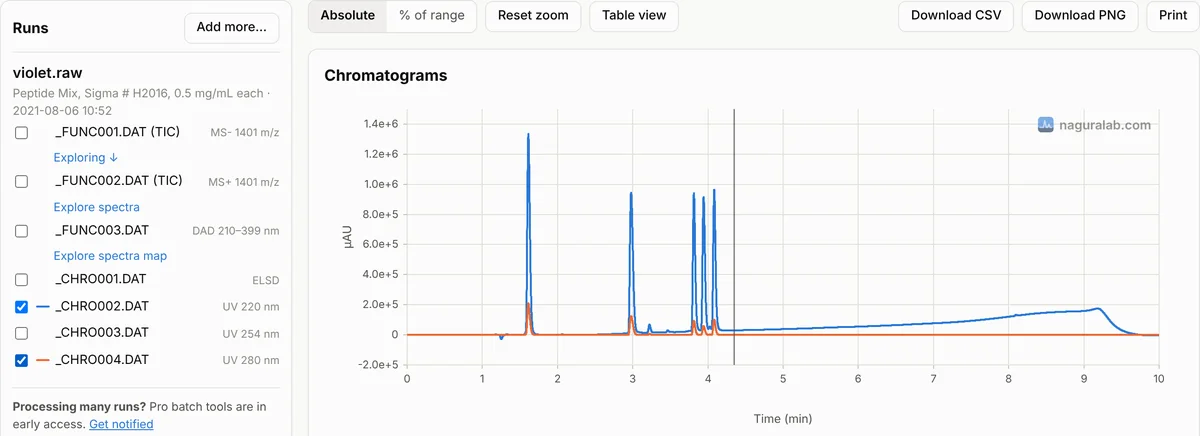
.rawfolder, or a folder that holds several of them. Dragging the folder onto the page works too, and so does a.zipof it. - Each function and channel is listed under the run. MS functions show their total ion chromatogram, with the polarity (MS+, MS-). MRM functions show one column per transition, labelled by the product ion.
- Click Explore spectra for the mass spectrum at any time, or Explore spectra map for the PDA data: the UV spectrum at any time and a chromatogram at any wavelength.
- Tick signals to overlay them, also across runs. Download CSV gives the plotted traces, Download PNG the figure.
The files are decoded on your computer and never uploaded. Mass spectra are grouped to whole masses (1 Da). PDA channels are shown in µAU, as the file stores them. Pressure and solvent composition are listed too, but not plotted by default.
Not supported yet: high-resolution (TOF) MS data, such as from Xevo G2 or Synapt instruments. Nagura Lab tells you when a run holds it.
Got only the loose files?
Files sent without their .raw folder (_FUNC001.DAT, _HEADER.TXT and so on) open in Nagura Lab as they are: put them in one folder and open that. MassLynx itself needs them back in a folder named after the sample with .raw at the end; Waters describes this in WKB221311, and recommends zipping a .raw folder before sending it.
From MassLynx itself
With MassLynx installed, its DataBridge program converts .raw data to ASCII text or NetCDF, one run at a time or after every acquisition (Waters WKB26188 and WKB57100). Waters notes that this exports mass spectrometry data only, not PDA data.
In Python
The open-source rainbow library (LGPL) reads .raw folders. It is what Nagura Lab's Waters decoder is tested against.
import rainbow as rb
run = rb.read("sample.raw")
print([f.name for f in run.datafiles])  # ['_FUNC001.DAT', '_FUNC003.DAT', ...]
# PDA data: one row per time, one column per wavelength
run.get_file("_FUNC003.DAT").export_csv("pda.csv")
What this does not replace
- Quantitation. Nagura Lab shows and exports the signals; it does not integrate peaks or replace TargetLynx, QuanLynx or your validated data system.
- Library search. Identifying compounds needs a library search tool; export the spectrum and search it there.